
Technology
Archived Posts from this Category
7 June, 2011
iOS5 Unveiled and It’s Pretty Darned Cool
Posted by blackcampbell under Computers, Technology | Tags: ios5, ipad |Leave a Comment
OSX Daily has the scoop on the 16 best new features, but here’s a quick overview:
The big one: NO BLEEDIN’ iTUNES SYNCHING REQUIRED! Wireless synching and PC free setup are going to be standard. There was nothing more annoying about the iPad than buying this shiny new device and having to get it home to synch it up before usage. Nothing was more annoying than having to synch and backup the iPad everytime you wanted to pull a few songs for a quick outing.
The next big one: the addition of all the cool multitouch gestures that I’ve been using by making my iPad a development machine. The pinch to close and other gestures make the home button almost obsolete and really increase ease of use. It was stupid not to have included it in iOS 4.3
Notifications have been updated so that they can be accessed from the home screen and the lock screen. They are all aggregated together and when using the device, they do not interfere with app use.
The iPad will get a split keyboard to allow thumb typing folks an easier experience.
There’s a new to-do list system (Reminders) and a new chat engine (iMessage) and Twitter is being rolled into the OS.
Software improvements to cameras. Hopefully this can cut the suck down on the iPad cameras some.
The big disappointment: where the heel is printing for the iPad, Cupertino? All the new features are guaranteed to make the iPad even more of a laptop killer…save for the lack of wireless (or hell, wired!) printing. This is the only aspect of the iPad keeping it from smashing the rest of the personal computing market.
25 April, 2011
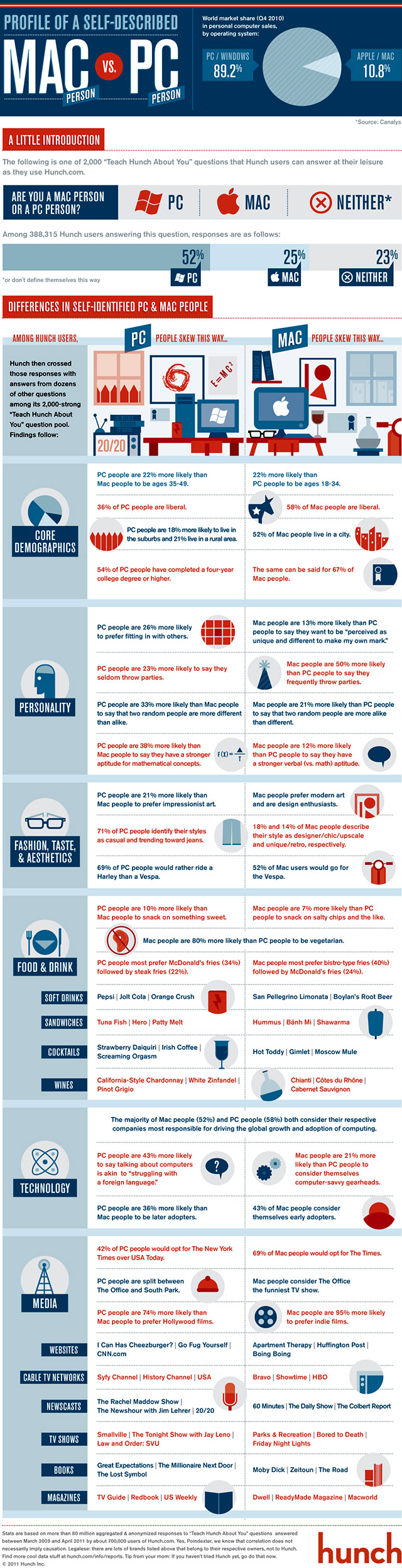
The boys and girls at Hunch put together an infographic on the differences between PC and MAc users based on responses of 80 million users to various questions…that’s a pretty good slice.
I was amused by how much I bob back and forth on the questions, but I’m also platform agnostic: I like Mac’s hardware/software integration and designs; I like Windows 7 for ease of use. Both OS are quite stable, but OSX seems sleeker and faster, and the software from various vendors definitely integrates better. PCs have the advantage on user tweaking for the hardware, it’s got better software support.
10 April, 2011
Initial Review: Apple iPad 2
Posted by blackcampbell under Computers | Tags: ipad 2 |Leave a Comment
I bought the original iPad a year ago and have loved the device since I first started using it…so much so the wife bought me a MacBook Air. The original device traveled with me internationally, was stuffed in a motorcycle tail pack for trips, did interstate jaunts. I wrote my dissertation proposal on it, painted pictures, played games, read books, and watched movies and TV shows on it. I used it more than I did my old Dell Inspiron 14 laptop (which was not exactly a shoddy device.)
I was a bit iffy on the new iPad. I played with it a bit and the speed of the machine was definitely improved. The addition of the cameras didn’t much matter to me, but the addition of a Verizon alternative for 3G was tempting. So I upgraded to the iPad 2 32GB Wifi+3G.
The good: the speed and stability are much improved. Websites load quick, games play fast (although my favorite, GT Racing is glitchy on the new device. Boo!) It’s thinner, it’s lighter — it’s verging to too thin and light, really — and still feels sturdy. Wifi runs just as well as the old machine. I’ve had none of the camera and microphone issues that others have had, so far, but I also haven’t really done much with them. I can’t comment on the 3G service, yet; I haven’t fired it up. The Verizon plan, however, starts with a 1GB/mo plan at $20…a much better deal than AT&T’s cheaper plan, but it’s not really cheap compared to the Death Star’s 2GB plan for a few bucks more a month. I never used a full 2GB when I bought that plan but did get close on the cheaper one. The speakers are about as good as the last, but seem a bit less powerful because of their placement.
Best of all: the battery life is maintained. I’m averaging an hour/10% of battery with wifi active and moderate usage. Turn that off and be sparing with the stuff you’ve got open and you’ll be able to pull the 14 hour marathon I did from Edinburgh Scotland to Albuquerque, NM.
The downsides: the camera — and there’s no way to put this kindly — suck. The backside camera is maybe a 1MPx and the resolution is worthy of a cheap 1999 digital camera. The frontside is better, but not much. There’s supposedly trouble with the cameras handling video, but I suspect that’s probably software related and will get fixed.
I had none of the other complaints — the backlight bleed, the yellow from the fixative, nor the alleged Verizon issues if you turn off 3G then reactivate. (This can be handled for the now by cycling the power.)
I also got the smart cover for the thing. One of the problems with the iPad — it’s gorgeous, but you want to protect it. Having a full cover kind of defeats the whole styling of the device. The smart cover protects the screen, but shows off the iPad. It connects with magnets and when closed, it turned the machine off; when opened, it powers on. Very slick. It can get in the way when held in landscape for games playing, and it’s supposed to fold up to be used as a stand, but I found it didn’t really like doing that. Practice your oragami skills… I had it come off by accident at one point while futzing with the way I was holding it, but that’s the worst thing I have to say about it.
So for looks and usability, the new iPad is tops. I can see it already taking over most of my computing needs from the Air. The price point’s the same as the old one, so it you were on the fence with the original, buy this one; if it’s too pricey, don’t.
7 April, 2011
Bullshit. Sophos, a free anti-virus program for Macs, just found three trojan exploits that cruised in from websites in my Java folders for Safari on my MacBook Air. And yeah, yeah — malware, virus, whatever. Mac catch crap just like PCs.
Expect to see more malware written for Macs as they gain market share. (It works just like real software — why write it unless there are machines to run it.)
29 March, 2011
Festo’s robotic herring gull takes flight.
Here’s the press copy:
Aerodynamic lightweight design
SmartBird is an ultralight but powerful flight model with excellent aerodynamic qualities and extreme agility. With SmartBird, Festo has succeeded in deciphering the flight of birds – one of the oldest dreams of humankind.
This bionic technology-bearer, which is inspired by the herring gull, can start, fly and land autonomously – with no additional drive mechanism. Its wings not only beat up and down, but also twist at specific angles. This is made possible by an active articulated torsional drive unit, which in combination with a complex control system attains an unprecedented level of efficiency in flight operation. Festo has thus succeeded for the first time in creating an energy-efficient technical adaptation of this model from nature.
New approaches in automation
The functional integration of coupled drive units yields significant ideas and insights that Festo can transfer to the development and optimisation of hybrid drive technology.
The minimal use of materials and the extremely lightweight construction pave the way for efficiency in resource and energy consumption.
Festo already today puts its expertise in the field of fluid dynamics to use in the development of the latest generations of cylinders and valves. By analysing SmartBird’s flow characteristics during the course of its development, Festo has acquired additional knowledge for the optimisation of its product solutions and has learned to design even more efficiently.
29 March, 2011
My Wish List for iPad 3
Posted by blackcampbell under Computers | Tags: ipad, ipad 3 |Leave a Comment
I had a chance to play with the iPad 2 at the university bookstore the other day (no waiting in line there!) and was impressed by the speed of the thing. I only ran a few quick tests — did a bit of typing on Pages, ran a YouTube video, and opened a few web pages: the newer iteration runs noticeably faster. It is also thinner and lighter, but I didn’t really notice that so much as I did the more beveled edging, which was less book-like and very pleasant.
I haven’t bought the new device because 1) I’ve only had the old one for a freakin’ year and I’m not swapping my pad every time they kick a new one out the door, 2) the old one works well enough for what I do that I’m not feeling the need to upgrade. Point of fact: I do most of my media cosumption on the iPad now, and even quite a bit of my production. I’d say between it and the laptop (a MacBook Air) I spend 60-65% of my computing time on the iPad. If I were running my old, heavy Dell Inspiron 14oo…it would be closer to 75% of the time with the iPad over the laptop, because it’s much easier to transport. The Air is light and comfortable enough that I drag it with me if I know I’m going to be doing some heavy typing. And 3) there’s a lot of reports of manufacturing defects with the iPad 2 — primarily in the screen, which is prone to backlight spillage and some color artifacts. Also, there’s a lot of reports that video on the camera is glitching.
So for me, I’m waiting for the iPad 3, rumored to be hitting the shelves in late 2011. I suspect most of the differences between the devices will be evolutionary, not revolutionary. Here’s what I’mhoping they’ll include:
This is the big one: No iTunes synching! The major Achilles Heel of the iPad is the need to — at least the first time and for software updates — synchronize with the bloatware we call iTunes. It seriously hampers the usability of the iPad, especially if travelling internationally, where you have to either get raped by AT&T on an international data plan, or jump through hoops with iTunes firing up another SIM card. (I went through this in Britain…it’s not hard, it’s just a pain in the ass.)
A shift to the Retina-style high resolution screens. The screen quality on the iPad doesn’t suck, but it could be better.
Instead of trying to give us a thinner machine, how about a bit more flexibility in functionality? I would like to see an SD or MicroSD card reader — even if it’s just the ability to access it through the camera adapters — and the ability to use the said devices for storage. (I use a high-speed 64GB SD Card as an extra drive on my Air, effectively increasing my storage by 50%.)
A shift from 3G to 4G. would be a good idea.
On the software side: What they hell were they thinking not rolling out the pinch to home and 4-figer swipe to change active apps? It’s so much easier to use and spares the Home button a ton of wear and tear. I fired it up by downloading XCode and setting the iPad up as a developer device. The addition of these multitouch features is an absolute must!
Printing Printing Printing! Apple has screwed the pooch a few times this last year. They were flanked by Google with cloud printing (which is great!), allowing you to print from the iPad. You have a few hoops to jump through, like emailing a file to your gmail account, but overall, it’s better than nothing. They lost out to Amazon on cloud storage, and honestly, earlier than that to Dropbox — which I highly recommend for online storage and sharing.
I really couldn’t care less about cameras and the other doo-dads, but the suggestions above I think would keep the iPad well ahead of any challengers that the other computer manufacturers might finally get out the door this year.
23 March, 2011
I ran the Mackeeper software that advertised all over the place on the web. It seems to be very thorough in finding things that are slowing down your machine — the junk files left behind because program coders are lazy, other tweaks to aid the machine. It’s getting good reviews on line..problem: it will find the stuff and not do anything about it until you shell out $40. I wouldn’t mind that if it had at least given me one free cleaning — most of the Mac applications that have a free trial will do this, at the very least. (This is the big scam for most Mac “freeware” — you download and can use the program, but when you go to update virus definition or the like, they hit you for money at that point. I’d rather they simply charged for the product up front.)
So I deleted it. On Macs, it’s supposed to be easy…drop it in the trash and empty. Save, thanks to lazy code monkeys, there’s always crap left behind. In this case, Mackeeper — which is not woven itself through everything — won’t shut down services when you quit the program. So it won’t delete. It’s frustrating and the tech support people treat you like an idiot.
I’m not a Mac savant; I just started using the OS, but I’ve managed to keep the computer pretty clean and running well. Here’s what you have to do to get Mackeeper off your machine if it’s being recalcitrant: You have to okay through all the services still up and running, and then restart the computer. It should remove the program.
It looks like it might run well, but there’s really no way to tell unless you pony up the $40.
16 March, 2011
More Multitouch for iPad
Posted by blackcampbell under Computers, Technology | Tags: ios 4.3, ipad, multitouch for ipad |Leave a Comment
One of the big disappointments of iOS 4.3 was that Apple didn’t give us the multitouch improvements promised. Among them is the ability to four finger swipe to change between active apps, instead of constantly hitting the home button; a four or five-finger pinch returns you to the home screen, four finger swipe up reveals the active dock, and down returns you to the main screen. It’s brilliant and would cut down sharply on the wear and tear of the home button.
After reading about a work around to get access to these features (they are on your iPad if you have iOS 4.3, they just aren’t active), I gave it a try. You need to hit the app store (if you’re on a Mac, that is) and download Xcode 4 (or find a freeware version, if you’ve got the time to dig around.) It’ll cost you $5. It’s a big file (4+GB), so don’t get too impatient, and Air users don’t be surprised if your fan goes nuts during the install. Once it’s loaded and fired up, plug the iPad in.
It’ll be recognized by Xcode. Hit the “Use as Developer” button. It’ll ask for information. Cancel. If you get an error code, just close the window. Unplug the iPad.
Enjoy the extra multitouch features. They’re great.
19 February, 2011
WAR PORN! Navy Develops Bad-Ass Free-Electron Laser
Posted by blackcampbell under Military, Science Fiction, Technology | Tags: lasers, navy weaponry |Leave a Comment
Sustained 500 kv (100 kWt) laser developed by the Office of Naval Research. Unlike solid state lasers, it uses electrons from the atmosphere, so it uses less power and can be frequency tuned.
 The Black Campbell