Computers


My “big drive” — a 2Tb Western Digital that I use to store our media library went sideways on my Friday, locking up while doing a simple shift of a video from movie to TV show category (thanks, iTunes; I know you were the culprit!) I could read, but not write to the drive and the Mac Air could not repair the drive.

As a result, I bought the Seagate GoFlex Home 2Tb network drive from Best Buy for $150. It’s an all-black unit that plugs into the networking base, which then plugs into the back of your router. Setup was simple, once I realized the drive was just not going to let me set it up without the Seagate software. I hate the way these companies set up the folders, and you can rarely mess with the higher level folders. Same issue here — I’ve got all these “GoFlex Public” and “GoFlex Private” folders. I’ll live with it because there’s a benefit — you can use their GoFlex Access app on your iPad to access the information from the drive via wifi, or through the internet (I’ve yet to try this, but the next trip to the coffee shop, I’ll experiment…)

Transfer speeds from the Air were very fast, the drive has functions, so far, flawlessly, and I was able to back up almost all of the iTunes library before the old Big Drive took a dump and had to finally be reformatted. I’m going to use the former for my Time Machine backups (as well as another disk) and to hold the iTunes library for my Air when it’s plugged in at home, but depending on how well the laptop and iPad can access the media through the internet, I may eventually ditch it or use it as a secondary backup for the media library.

My main concern about the drive is the same as the main benefit: it’s on the internet. Someone could , potentially, locate and crack the drive. The other issue is the Gestapo tactics of the RIAA and MPAA, and their minions in the Department of Homeland Security. These copyright trolls have been working hard to find any excuse to limit our free and fair use of media we’ve already bought form them in the name of preventing piracy (which studies repeated show do not impact sales, save to drive them up — it’s advertisement, like a radio station.)

If it doesn’t crap out like the WD drive, it’ll definitely be worth the $150.
Some douche out of Bangladesh (allegedly) calling himself Tiger-M@te hacked the server over at the gaming blog Campaign Mastery and is awfully proud of himself for his mad skillz and his stripey bestiality.

Simply put, mate,you’re not cool wrecking somebody’s site; it just makes you a destructive asshole.

Okay, I finally decided to take a chance and try to upgrade my iPad 2 to iOS 5 last week, after the disastrous first attempt. It finally went through, with no issues. So here’s what I’ve found: it’s a solid update, but it’s not going to change your life, bring you wealth and happiness, nor cause the stars to align and give us world peace, like most fanboys would have you think.

The bad: You don’t get Siri on the iPad. But then you’re not clogging the internet with useless questions to impress your friends with how Siri can do whatever. Also, iPhone users are seeing serious battery life issues thanks to iCloud synching, which drains your battery a whole hell of a lot faster than Flash ever did. One of the other culprits in this is the crap-laden Newstand app, which loads your machine up with publication specific apps (some were offered free — but not any issues…jus the app) which also ping the web regularly. You can’t delete newstand if you want to, nor hide it (easily) in a folder. It’s crap.

Also, if you have a first-generation iPad, it won’t do multitouch, as it will on iPad 2.

The good: You can use the dictionary function pretty much anywhere on the machine now. The notification center is nicer, less intrusive, but I’ve found mail doesn’t push to it particularly well. The iCloud synch for calendars and contacts is useful. I wouldn’t synch much else unless you want to have a machine that runs for 2 hours.

The really good: the Twitter integration is superb! Also, while it’s not really iOS specific, the Facebook app is near seamless. The ability to undock your keyboard and have it split for thumb use I thought would be useless — it’s not. It’s fantastically easy to type with.

The outstanding: Best of all, you’re off the iTunes synch if you dont’ want to. The iPad is now a stand-alone device. I tried wireless synching and while it takes a while, you can still use the device without issue. A top-notch improvement over the earlier iterations of iOS.

Since I run almost nothing through the iCLoud or iTunes wifi synch, I’ve had no battery issues, and have actually seen a slight improvement (I think) in battery life — about 1:10 hours/10% of battery. As said, I like the improvements to the keyboard, the wireless upgrades and synching, and find the device to be even more useful that before. I think my next experiment will be to see if I can type more comfortably over time with it that I could before. I find trying to do long manuscript work with the iPad can get tedious, and still prefer a physical keyboard.

I’ve been trying to upgrade my iPad2 since about 1100 my time. I purposefully downloaded the package rather than try a straight download and install on the off chance they would have issues with a product they’ve been hyping all year. A good call…

The Apple servers are slammed because every bloody iDevice out there is trying to upgrade, and worse — you have to go through the cowpat that is iTunes to do it. So after waiting through the glacial backup process for the iPad, I’m running into an “inner error” — that’s the verification server failing to recognize you. Worse for an iPad user: you have to wade through the backup process every damned time you make the effort to upgrade; you have to wait an hour just to get told “sorry, pal!” by the Wizards of Cupertino.

A magical device and a great customer experience, indeed.

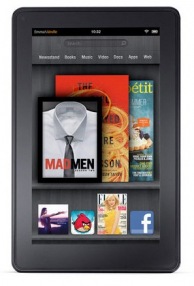
Well, that’s not exactly fair…the new Amazon Fire looks like it might be a great entry-level tablet for media consumption; the iPad’s essentially (in my opinion) the future of laptops (if they could only unlock the file system so people can use their stuff between programs/apps/whatever.) The Amazon boys have been itching to pick a fight with Apple over the latter’s insistence on trying to horn in on everyone’s business for 30%, and this is just the latest attempt to wrestle ebook and other sales from the Cupertino mob.

So what does the damn-good price of $199 buy you?

It’s about the size and weight of the Nook — with a 7″ screen with 1024/600 resolution, and it’s about twice the weight of the iPad2. It’s running a proprietary version of Android 2.3 with a proprietary browser (Amazon Silk) and looks to be fairly locked down — a complain about the Apple, but probably a good idea for stability and security. It’s got wifi but no 3G or GPS, but it does have access to one of the biggest e-media outlets and there’s apps, a-plenty. The processor is, on paper, comparable to the iPad — a 1GHz dual core with 512mb RAM (the CPU and GPU on the iPad is far superior, however), and battery life is supposed to be about 8 hours…not too shabby!

Against the other competition — Amazon’s own Kindles, and B&N’s Nook, the Fire is the clear winner. Against the iPad2? If you’re looking for a device to read, surf, and do the basics of a tablet, this is a good and cheap alternative. If you’re looking for a device that can replace your laptop — once iOS5 hits in a few weeks, the iPad is still the choice to go with.

From the folks at Scoopertino.com…


So far, I’ve very little to complain about with the new OS X upgrade save one thing…Apple fix the f#$king issue where the wifi drops coming out of sleep. Check your damned support boards — it’s happening on MacBooks, Airs, and iMacs. When the computer goes to sleep, 4 thimes out of 5 it drops the wifi connection; it’s even more ornery if you’ve switched locations.

Fix the problem! It’s really damned annoying.

Alrighty…in an apparent attempt to appear more to have joined the MacBorg, I downloaded the new OSX Lion upgrade. First, the cost — $30. For all your Macs, not a crappy single machine license for $150+ depending on where you go for Windows 7. Maybe Redmond should take a friggin’ hint… Second, the upgrade process: no disk. You download it from the Mac App Store. Download took about 30 minutes without issue. The machine ran the upgrade with no loss of personal data (although I backed up my drive just in case…) in less than the estimated 33 minutes. No issues, other than some of your programs will run as if it’s the first time. Acrobat was particularly lagging.

The machine I’m using: a MacBook Air with 128GB SSD and 4GB RAM. The speed was a bit slow for the first 10-15 minutes, I suspect as Lion figured out where all the libraries were, connected file types to programs, etc. As stated, Acrobat was slow the first time. Glacial, actually. Word for Mac was a bit laggard the first go, as well, but was very fast on firing up and bringing up a file on my SD Card the second time. Pages loaded quickly and without issues. Twitter the same.

The changes made — the two-finger swipe to scroll is reversed to copy the iPad. It’s great once you’re used to it, but swear inducing for the first few minutes. Gone is the four-finger side to side swipe to bring up the menu of open programs. I would REALLY hate this if the Mission Control feature wasn’t so good: four finger swipe up brings up all the programs and files open and groups them by the program. Swapping is easy and quick. A four finger swipe down and whatever program you’re in shows all the open files, so you can swap if you’ve got a crowded desktop; there’s a recent files list at the bottom of the screen, if you need to reopen something. Now, if you have a bunch of stuff open full screen, you can swipe left to right through the windows.

Mail looks more like the iPad. Not a huge fan of the layout, but it’s acceptable. iCal looks like the iPad, as well, but putting together an event is much much easier…when showing events by the day or week, you can drag to change times, etc. In the month view, which is what I usually run, you used to have to set up an event, then get out of it to alter it. Now you can just two-finger click and do so. Easy. Better. It still has a habit of loading up doubles of events if they were created on your iPad or iPhone as well as on the computer. A merge function would be a good idea. (If there is one, I haven’t found it and would appreciate a heads-up…)

Slightly annoying: my user name is on the menu bar and I havne’t figured out how to get it off. I know who I am, thanks, Air. Otherwise, I’d have to say it looks good and I even seem to have recovered a gig of SSD space…maybe Lion’s tighter code than Snow Leopard?

OSX Daily has the scoop on the 16 best new features, but here’s a quick overview:

The big one: NO BLEEDIN’ iTUNES SYNCHING REQUIRED! Wireless synching and PC free setup are going to be standard. There was nothing more annoying about the iPad than buying this shiny new device and having to get it home to synch it up before usage. Nothing was more annoying than having to synch and backup the iPad everytime you wanted to pull a few songs for a quick outing.

The next big one: the addition of all the cool multitouch gestures that I’ve been using by making my iPad a development machine. The pinch to close and other gestures make the home button almost obsolete and really increase ease of use. It was stupid not to have included it in iOS 4.3

Notifications have been updated so that they can be accessed from the home screen and the lock screen. They are all aggregated together and when using the device, they do not interfere with app use.

The iPad will get a split keyboard to allow thumb typing folks an easier experience.

There’s a new to-do list system (Reminders) and a new chat engine (iMessage) and Twitter is being rolled into the OS.

Software improvements to cameras. Hopefully this can cut the suck down on the iPad cameras some.

The big disappointment: where the heel is printing for the iPad, Cupertino? All the new features are guaranteed to make the iPad even more of a laptop killer…save for the lack of wireless (or hell, wired!) printing. This is the only aspect of the iPad keeping it from smashing the rest of the personal computing market.

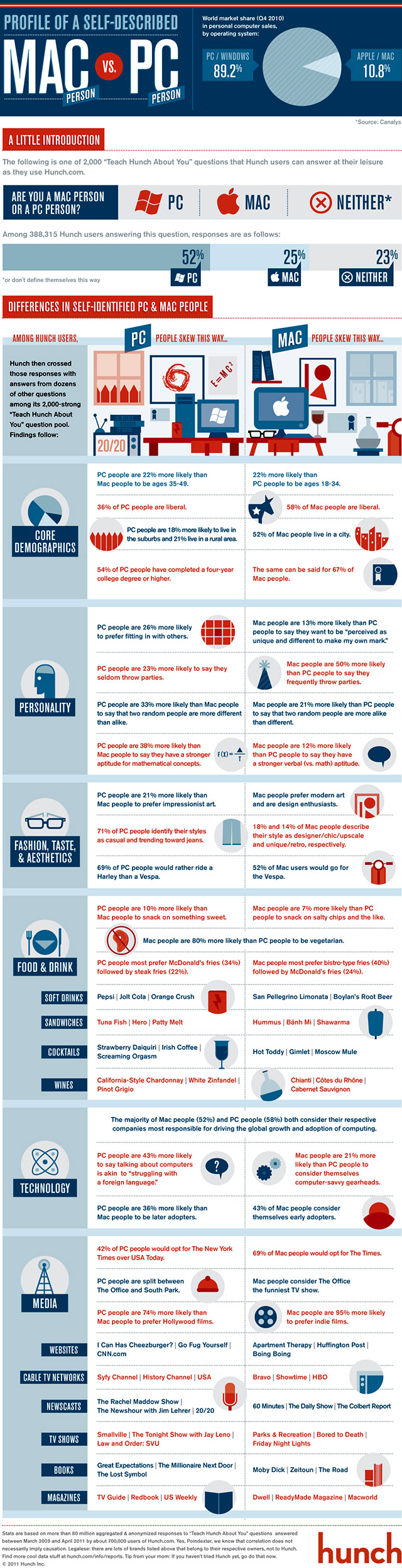
The boys and girls at Hunch put together an infographic on the differences between PC and MAc users based on responses of 80 million users to various questions…that’s a pretty good slice.

I was amused by how much I bob back and forth on the questions, but I’m also platform agnostic: I like Mac’s hardware/software integration and designs; I like Windows 7 for ease of use. Both OS are quite stable, but OSX seems sleeker and faster, and the software from various vendors definitely integrates better. PCs have the advantage on user tweaking for the hardware, it’s got better software support.

« Previous PageNext Page »