I’m in.
31 July, 2012
I’m in.
30 July, 2012
Want “Save As…” Back in Mountain Lion? You Can Have That
Posted by blackcampbell under Computers, Technology | Tags: os x mountain lion, save as command |Leave a Comment
First you want to reset the keyboard shortcuts for Duplicate to something not what we’re going to do.
Go into System Preferences, Keyboard, then to Keyboard Shortcuts. On the right, click on “All Applications” and hit the + sign button. You’ll get a window something like this:

To get the command to work, you’ve got to do it right. Type Save As with the capitalizations. You can’t type the elipses, I found; you have to use Option+semi-colon. Then in the shortcut Shift+Command+S (or whatever you want.)
So long as the program allows for Save As, it should show up in the File menu, as well!
30 July, 2012
Mountain Lion Users Beware: Dictation Wants Your Contacts
Posted by blackcampbell under Computers, Technology | Tags: os x mountain lion |Leave a Comment
Now, allegedly it’s because names are notoriously difficult for speech recognition (and people for that matter) to capture, but Apple sends your speech-to-text data — and your contacts list — to “the cloud” (their massive server farms) to do the translation, much like Siri on the iPhone.
When you go to the Systems Preferences and Dictation & Speech, hit the button about privacy at the bottom. Here’s what you’ll get:
When you use the keyboard dictation feature on your computer, the things you dictate will be recorded and sent to Apple to convert what you say into text. Your computer will also send Apple other information, such as your first name and nickname; and the names, nicknames, and relationship with you (for example, “my dad”) of your address book contacts. All of this data is used to help the dictation feature understand you better and recognize what you say. Your User Data is not linked to other data that Apple may have from your use of other Apple services.
Information collected by Apple will be treated in accordance with Apple’s Privacy Policy, which can be found at www.apple.com/privacy.
You can choose to turn off the dictation feature at any time. To do so, open System Preferences, click Dictation & Speech, and then click Off in the Dictation section. If you turn off Dictation, Apple will delete your User Data, as well as your recent voice input data. Older voice input data that has been disassociated from you may be retained for a period of time to generally improve Dictation and other Apple products and services. This voice input data may include audio files and transcripts of what you said and related diagnostic data, such as hardware and operating system specifications and performance statistics.
You can restrict access to the Dictation feature on your computer in the Parental Controls pane of System Preferences.
So user beware.
28 July, 2012
New Addition to the Garage and a Review: 2010 Triumph Thruxton
Posted by blackcampbell under Motorcycles | Tags: 2010 triumph thruxton |Leave a Comment
i was out for my weekend ride in the country and stopped at Fastbecks, back in Cedar Crest (run by a friend of mine) just to chat and check on some parts for the wife’s bike. On a lark, I decided to take out a used Thruxton, and run it up Sandia Crest. The Crest road is a “the” ride for the Albuquerque area — it’s 120 turns in about 12 miles to the top (10,000′ or so, compared to the 6,500 at the bottom.)
Just a hint of the kind of road I’m talking about… Fastbecks is at the bottom of 536 (the right.)

On my Street Triple, the ride is pretty exciting and I’ve found my comfort level with the bikes makes for a pretty quick trip up and down. The Thruxton is, on paper, pretty gutless compared to Hecate (my Street Triple) — 62hp compared to the 110 or so with the Two Brothers pipes on the Triple; 52 ft-lbs of torque…about the same. It weighs about 50 pounds more than my bike, so I figured it would be so-so, speed and maneuverability wise.
I was in for a surprise…
Despite the more traditional retro cafe racer bulk, the bike was fast! The gearing is tall, more like a Ducati than a Triumph triple, and I was a mile down the road in second gear in about a minute. The sharp turns of the Crest were nothing for this beast. I was easily handling turns with the same aplomb as Hecate — this thing can turn! It requires a bit more muscle than the lighter Triple, but not much. The torque brings it off the line just as fast, and you don’t have to work the throttle as much. To top it off, the engine doesn’t gush heat like the smaller mill, and the Epco cafe pipes were beautifully tuned to purr and growl, but without the ear-splitting roar of the Two Brothers for Hecate. I loved it!
I took the bike for a run to Madrid, about 25 miles to the north, and back. Mostly straight road with a bunch of nice sweepers, I was looking to see how she’d feel for longer hauls. By now i was already thinking i wanted one. I got back and got a straight trade banged out for Hecate and took the Thruxton home a few hours later.
I’m breaking my mythological naming convention with this one and am calling her Trixie, after the girlfriend in Speed Racer — pretty, classy, but surprisingly tough.
 The important bits: The Thruxton is a fuel-injected 900cc parallel twin, with the injection hidden in fake carbs. There is a “choke” which will fast idle the machine; I find she’s a bit sluggish when you first wake it after a while, and a quick pop of the choke gets her running right. Even flogging her to test her ability to pass at speed and to get an idea of her top speed, as well as some around town driving, I got 60mpg. Assuming this will be a high end of the fuel consumption, I’m guessing a range of 240 miles (max!), but more likely 180-200 on the 4.2 gallon tank. She is fast as hell accelerating up to about 90mph, then her power starts to drop off quickly. I absolutely was not speeding, but 110mph is definitely achievable. The wind buffeting is minimal due to the flyscreen, but above 80 you really start to feel it.
Gauges are analog — speedometer with gas and engine warning lights ont the left, tach on the right, and a cluster of indicator lights underneath. The key is on the head of the bike on the left — not the usual place for the sportbike crowd, and I’m still getting used to it.
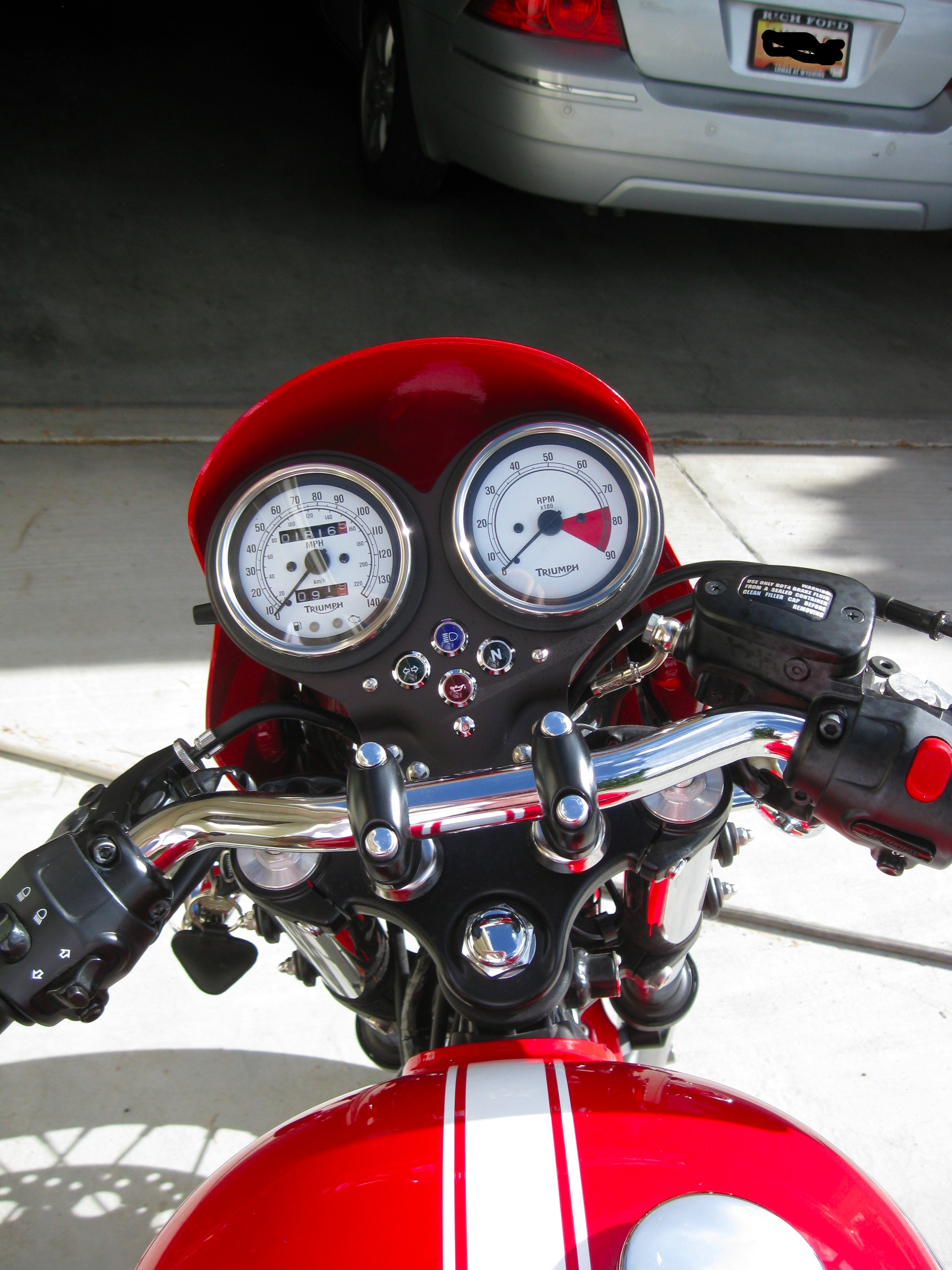
Did I mention that i got the bike with only 1800 miles on it, compared to my Triple’s 10,000 or so?
28 July, 2012
Great Site Captures the Absolutely Mindboggling Bigness of Space
Posted by blackcampbell under Space[3] Comments
OMG Space was created by a Canadian web designer as a graduate project. It’s stunning. Each planet has an infographic on the missions to them, and there’s a good size comparison of the planets, against the sun.
26 July, 2012
Quick Review: OS X Mountain Lion
Posted by blackcampbell under Computers | Tags: osx mountain lion |Leave a Comment
By now the Mac fanbois have devoured the various gushings of the technorati on the internet and have seen all of the glowing reviews of Mountain Lion, the new OS for Apple’s computer line. I’m a relatively new user of Macs, having switched over when the wife bought me an Air back in late 2010. It’s a superb little machine, I like the interface, but I thought Lion was a disaster. Why? Because prior to that Snow Leopard ran quickly and quietly. Lion, not so much; I saw the beachball much more often, especially when external drives (a must for the small SSDs of the Air), hear the fan crank up to Boeing 787 levels of noise when doing things as simple as watching a short clip on the net or as data intensive as cutting a DVD so I could watch it on my iPad (the gateway drug of the Apple world.)
I was never happy with Lion, but was willing to ignore it. Then comes along Mountain Lion. Notification Center, just like iOS! Reminders, just like iOS! Airplay, just like iOS…unless you have anything older than a Mac produced last week. Hey, wait…I was able to Airplay on my “old” machine with Lion; what the hell? Admittedly, Airplay made my machine labor hard and ran the fans loud enough I had to crank the TV to hear dialogue (seriously, Hollywood, balance the damned sound in movies better!), but it worked. With Mountain Lion? It just locks up iTunes good and dead until you force quit.
No Airplay: Bad. the skeumorphic contact book and calendar interfaces: Bad. Dictation (voice to text) for most programs: Good, but not great — it’s got a very limited cache because it sends what you say to Apple for translation to text. I have a few security qualms about that, on top of it being slow and buggy.
I haven’t bothered with Safari’s new features, since I use Chrome. The share feature being all over the place (but not in Chrome): ambivalent. I use it a lot on my iPad, but perhaps it’s because the laptop is my “work” machine I don’t find it that useful. I’m not surfing the net looking for intriguing things to send my friends when I’m on the Air, unlike the iPad (the first bit of technology, other than vehicles, that I’ve named.) So I’m also not very impressed with the Twitter integration, either, although I use it heavily on the iPad.
iTunes, the bane of pretty much anyone’s existence, seems to run a bit smoother and it’s talking to my network drive without any lag that I can see. Mail having VIP slots for your important contacts? Good. Having reminders and notes separated from mail: Even better. Notification center: Fantastic. More so than I would have thought. Having all of my programs run on ML: Brilliant.
The best part: I haven’t had the fan come on more than once since loading Mountain Lion…and that was pushing a full backup of 52Gb to a network drive. Even then, it only came on for a short time. The beachball has only put in an appearance when iTunes locked up on Airplay, and as I type, I have a movie playing in the background, Mail open, Acrobat open, Word open, and Chrome with 5 tabs. No fan (temps did jump from about 100F or so to 160F.) No lag. Just like when I was running Snow Leopard.
Is it worth it? I blew some of my royalty money from my book sales on the $20 for Mountain Lion and unlike Lion, I think I got my money’s worth. It’s a definite buy — there’s not enough bad changes to not do it, and the bits and bobs (there’s no major changes anywhere) that improve the user experience are definitely worth it.
I just fired up iSkysoft’s iMedia Converter to rip a DVD to see how the machine would handle it. The processors hit a peak of 189F and 180F respectively, with stable temps about 5 degrees cooler. This is on par with the performance on Lion. Fans a-blazin’.
23 July, 2012
Caravan Palace in Concert
Posted by blackcampbell under Music | Tags: caravan palace, electro-swing |Leave a Comment
I just discovered these guys via a friend this evening — electro-swing and it’s damned cool:
18 July, 2012
Marvel Heroic RPG Character Datafile: Spiral
Posted by blackcampbell under Roleplaying Games | Tags: marvel heroic roleplaying game |Leave a Comment
I decided to take a shot at building one of my favorite characters from the Marvelverse…I don’t know why this character appeals so much — maybe it’s the visual, maybe it was Longshot was just so out there it caught my imagination…here she is:
SPIRAL (Ricochet Rita)
Affiliations: Solo d10, Buddy d6, Team d8
Distinctions: Lovelorn, On Her Own Side, Slave Hunter
POWER SETS:
Genetically-Altered Cybernetic Alien
Superhuman Reflexes d10 Superhuman Psychic Resistance d10 Superhuman Durability d10 Enhanced Strength d8 Enhanced Stamina d8 Enhanced Speed/Jump d8
SFX, Multiple Arms: Add d6 and keep an extra effect die per extra opponent; SFX, Psychic Domination: On successful reaction to psychic stress, inflicts effect die on attacker with same complication, etc.; +1PP to for +1 step to effect; LIMIT, Exhausted: 1PP when GACA power is shutdown; recover with opportunity or in transition scene.
Extradimensional Sorceress
Sorcery Mistress d10 Energy Resistance d10 Energy Blast d10 Teleport d10 Invisibility d10 Weapon (Swords) d6
SFX, Afflict: Can add or subtract power level to a target equal to the number of shifts over the reaction to the spell; SFX, Counterattack: Reaction to energy attacks allows her to inflict stress equal to her reaction effect die; SFX, Life-force Drain: 1PP and Sorcery attack to target causes Physical stress to target and heals all stress and trauma; LIMIT, Astral Silhouette: Invisibility shutdown against astral or mystic-based senses; LIMIT: Energy blast shutdown against living creatures; only effect on inanimate objects or mystic/energy “objects”; LIMIT, Gotta Dance!: If Spiral cannot dance her spells, 1PP and shutdown any Sorceress power created assets or complications. If she fails a resistance reaction to distraction or suffers stress, 1PP and the power and its assets and complications.
Specialties: Acrobatics Mistress d10, Combat Mistress d10, Cosmic Expert d8, Mystic Mistress d10, Tech Mistress d10
Assets: Can call on slave hunters from the Mojoverse (Gang of 3d8) with a PP, has access to The Body Shop — 3d8 genetic and cybernetic body modification medics, or call on members of Freedom Force, depending on the period she is being played.
History:
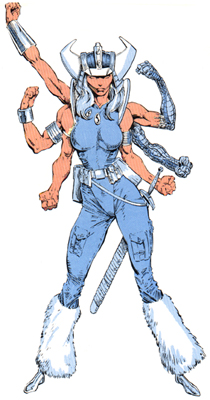 Rita was a successful stuntwoman nicknamed Ricochet Rita when she encountered the being known as Longshot, a genetically engineered slave of another dimension ruled by the monstrous Mojo and leader of a rebellion there. Rita helped Longshot, falling in love with him in the process. At some point, Rita was abducted by Mojo’s agents and abducted to his universe. There, she became, Spiral a slave-hunter for the Spineless Ones and the the property of Mojo. To ensure Spiral’s hatred of other humanoids, Mojo had Spiral designed with six arms rather than only two and gifted her with the ability to wield magic.
Mojo sent Spiral and various rebel hunters to recapture Longshot, who at the time was rendered amnesiac from a previous capture. They followed Longshot through an interdimensional portal to Earth, although they were ultimately unsuccessful.
It is unknown if Spiral was trapped on Earth or elected to stay. Spiral enlisted in Freedom Force, the United States government’s team of superhuman agents, as a means of learning more about Earth, and served with them on most of their adventures.
Later, Mojo joined Spiral on Earth, intending to prevent Longshot from returning to their native world and stirring up the slaves. Mojo then decided to take over Earth himself, but was defeated by Longshot. Spiral led Mojo back to their home-world. At some point, Spiral returned to Earth and to Freedom Force.
While on Earth, Spiral also created a guise as “pro-priestess” of The Body Shoppe, a place where genetics and technology are used to alter people in the same way that Spiral herself was altered, she is responsible for the transformation of the Japanese warrior Lady Deathstrike into a cyborg, as well as, presumably, many of the cyborg Reavers. Later, Spiral lured the mutant Rachel Summers, the X-Man once known as Phoenix, to capture and slavery in Mojo’s universe. Later still, Spiral and Mojo temporarily captured many of the X-Men’s proteges, the New Mutants, the hero Captain Britain, and his sister Betsy Braddock, later known as Psylocke. Spiral was involved in Braddock’s cybernetic implants in place of her eyes.
Spiral eventually left Freedom Force after a clash with the X-Men in Dallas, Texas, where the X-Men seemingly died in battle with the trickster-god, the Adversary. She presumably returned to the Mojo’s universe, where later, the X-Men Longshot and Dazzler led a rebellion against Mojo. For reasons of her own, she teleported the X-Men to the universe to aid the rebellion. After Mojo was seemingly killed by Longshot, Spiral teleported away.
Later, Mojo returned with Spiral at his side to capture the hero Shatterstar. Shatterstar was mortally wounded by Mojo by being transformed into a digitized state. Spiral saved his life, however, by transporting him and his ally Longshot to the bedside of a comatose youth named Benjamin Russell, who was then physically linked Shatterstar. In that act of heroism, Spiral revealed to have some very deep feelings for Shatterstar and Benjamin Russell, but nevertheless teleported away, apparently back to the Mojo’s universe.
Spiral later appeared during the hero team Excalibur’s encounter with the mystic Dragons Of The Crimson Dawn. Spiral was somehow mystically linked to the Dragons, wearing the same Crimson Dawn-tattoo that Psylocke possessed. After the Dragon’s defeat, Spiral escaped to an unknown location.
 The Black Campbell